How to Create Text-Based SVGs for Print on Demand
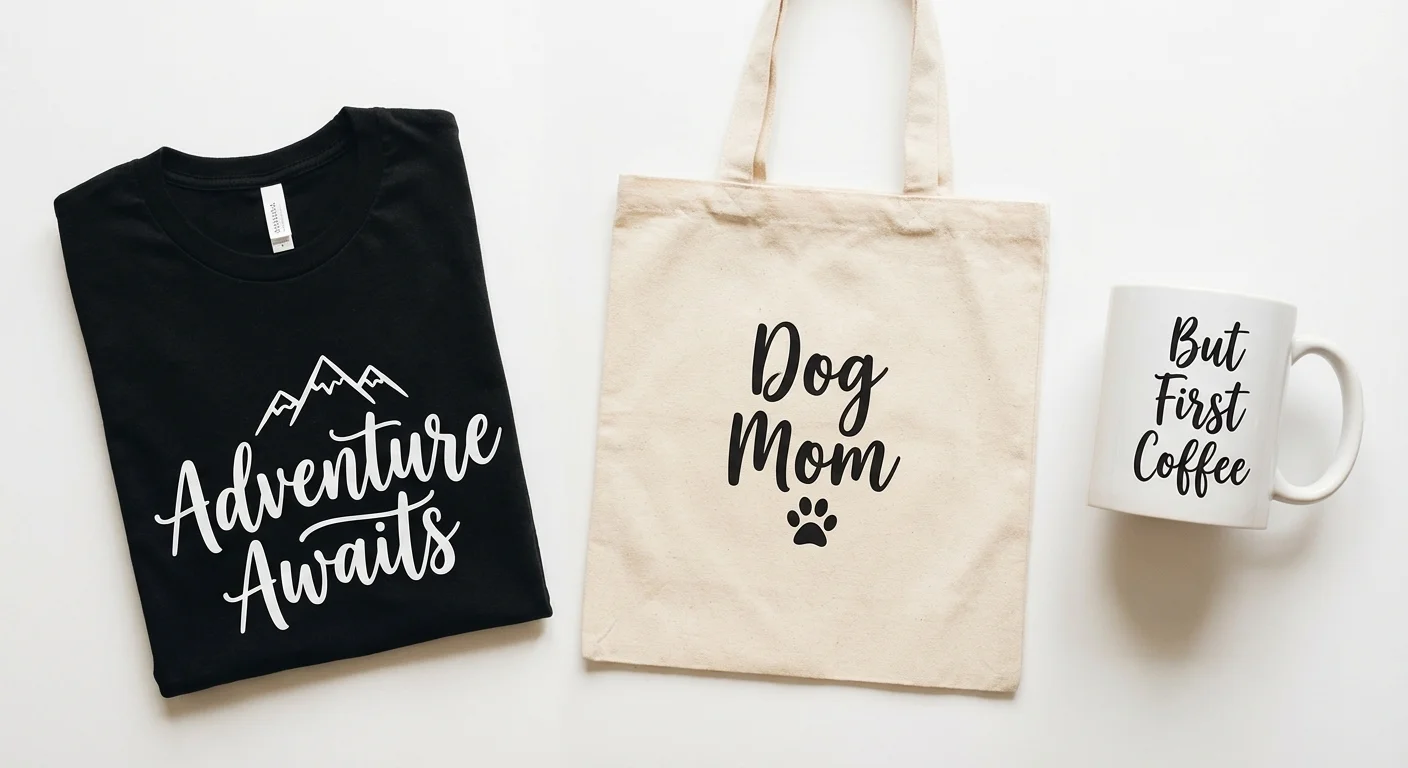
Text-based designs dominate Etsy’s SVG market. “Dog Mom,” “But First, Coffee,” “Best Dad Ever” with decorative elements, simple phrases on t-shirts, mugs, and tote bags. The market is massive, margins are around 80-85% after Etsy’s fees, and once a design is created, it sells forever with zero inventory and zero shipping.
But creating unique, high-quality text SVGs at scale has always required either strong design skills in Illustrator/Inkscape or expensive freelancer commissions. That’s where AI text-to-SVG changes the game.
Why Text SVGs Sell
Before we get into how, let’s talk about why this market works:
- Digital products have near-zero marginal cost. You create once, sell unlimited times
- Buyers need these files. Cricut and Silhouette users want cut-ready SVGs for their projects, and many can’t (or don’t want to) create their own
- Individual SVGs sell for $2-$5 on Etsy. Bundles of 20-200 designs sell for $20-$50
- Top-performing single listings have generated $7,700+ in revenue
- Profit margins are around 80-85% after Etsy’s fees (6.5% transaction fee, 3% + $0.25 payment processing, $0.20 listing fee)
- Year 1 income of $200-$1,500/month is realistic with consistent effort and solid SEO. Top performers can exceed this significantly
The catch? The market is competitive. There are over 100,000 “mom life” SVG listings alone. Standing out requires unique designs, good SEO, and volume. That’s where AI-powered generation helps: you can create and test designs far faster than manual design allows.
The Text-to-SVG Workflow
Lineart.ink’s text-to-vector feature lets you describe a design in plain English and get a clean SVG file ready for your products.
Step 1: Describe Your Design
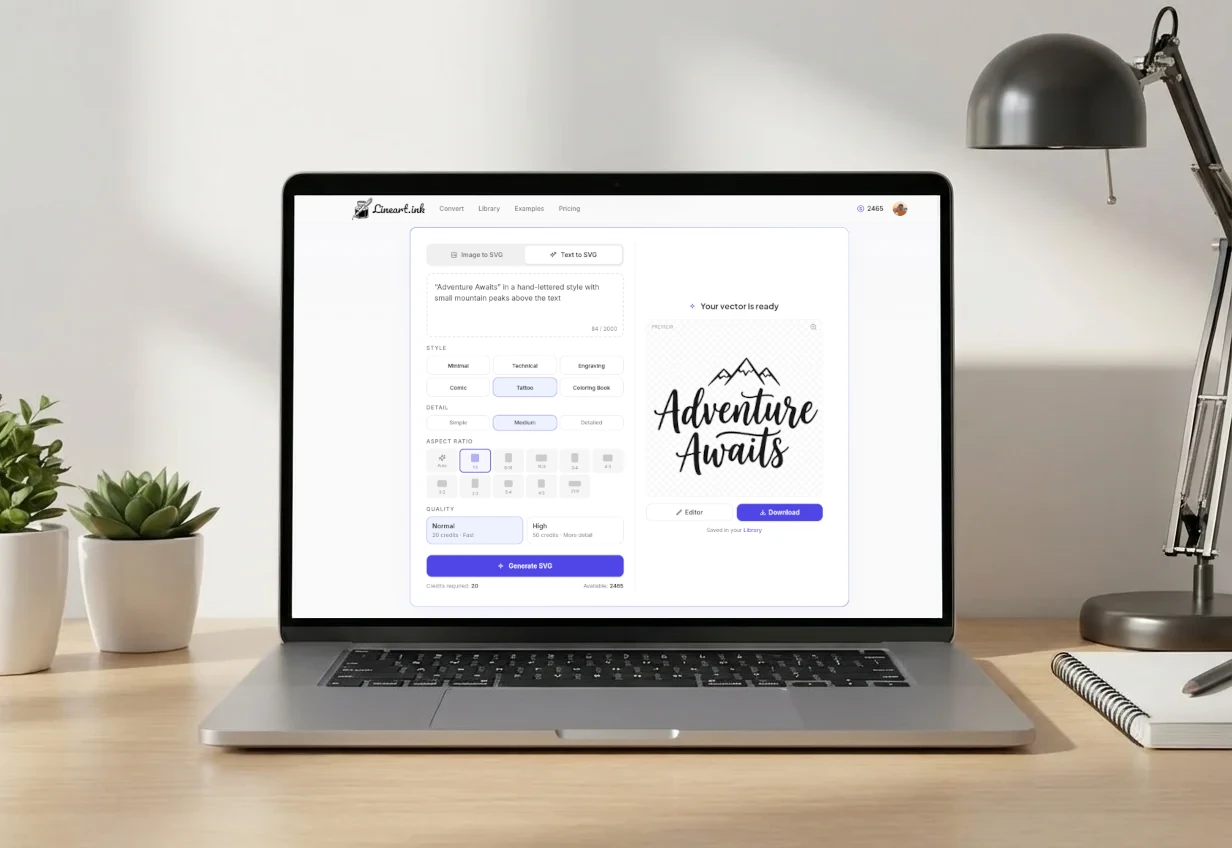
Instead of opening Illustrator and spending 30 minutes choosing fonts and arranging elements, choose the Text to SVG tab and describe what you want:
“Adventure Awaits” in a hand-lettered style with small mountain peaks above the text
The AI generates a unique vector design based on your description. Each generation costs 20-50 credits (as low as $0.07 per design on the Pro plan).
Step 2: Refine and Iterate
Not quite right? Adjust your prompt:
- Style keywords: vintage, retro, minimalist, bold, handwritten, script, farmhouse, boho, western
- Decorative elements: with stars, with florals, with a banner, with a heart, with a wreath
- Layout direction: stacked, arched, in a circle, with a tagline below
- Complexity: simple and clean, detailed and ornate, distressed/grunge texture
Try 3-5 variations of the same concept. At $0.07-$0.20 per generation depending on your plan, testing is cheap. Keep the best one.
Step 3: Edit in the SVG Editor
Open your design in the built-in editor to make final adjustments:
- Resize for different product dimensions
- Adjust spacing between elements
- Remove or rearrange decorative elements
- Add or modify text (names, dates, custom phrases)
- Export in SVG format
Step 4: Create Product Mockups
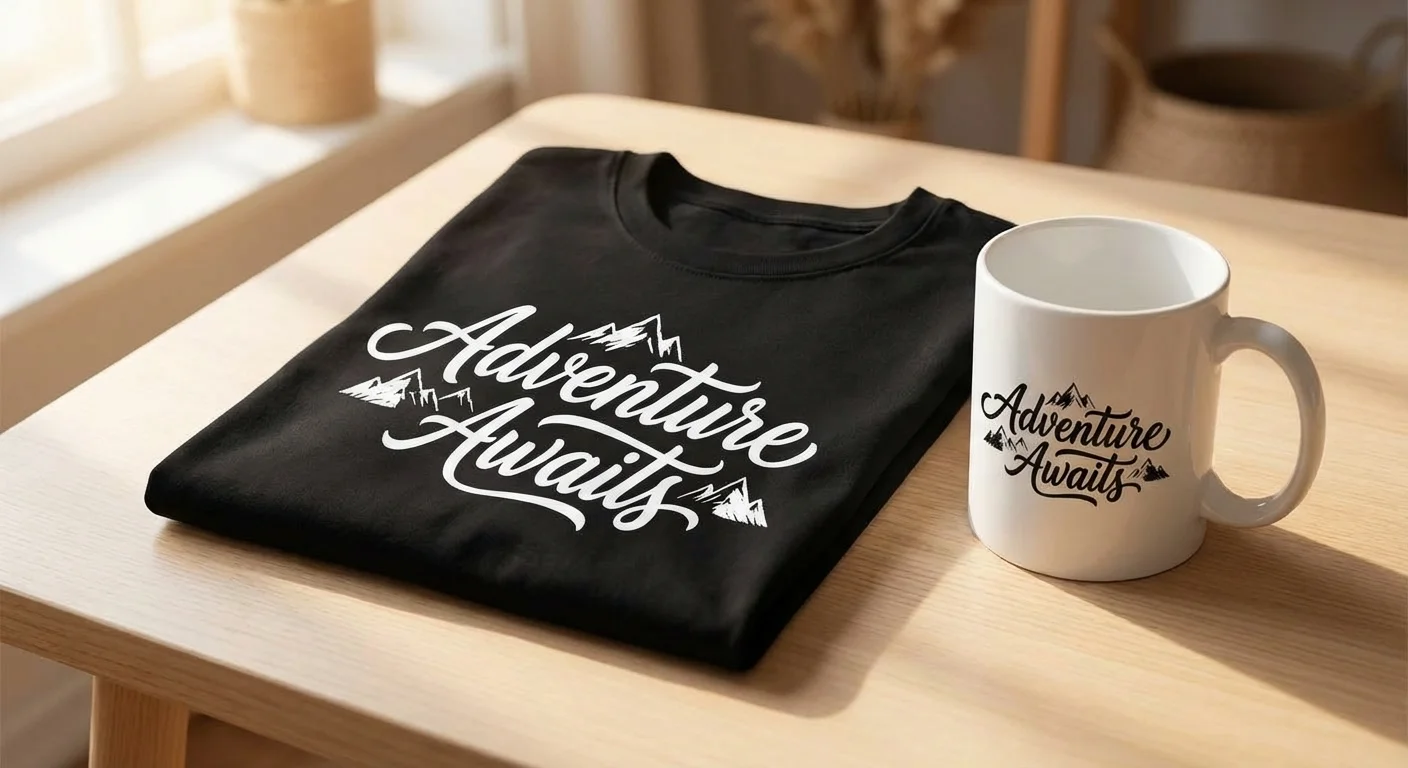
Before listing, you need mockups showing the design on real products. Buyers need to visualize the design on a t-shirt, mug, or tote bag before purchasing.
Free mockup tools:
- Placeit (by Envato) has thousands of product mockups
- Canva has basic mockup templates on the free tier
- Smart Mockups offers free product mockup generators
Show the design on at least 2-3 different products in your listing photos. The first listing photo is critical because it drives click-through rates, which directly affect your search ranking.
Step 5: List on Etsy with Strong SEO
This is where most new sellers underperform. A great design with a bad listing won’t sell.
Title: Lead with your most important keyword phrase. “Funny Mom Life SVG Bundle for Cricut Silhouette” beats “Cute Design Bundle 01.”
Tags: Use all 13 tags. Mix high-volume terms (“svg files for cricut”) with long-tail phrases (“funny camping quote svg for shirts”). Research with eRank, Marmalead, or Sale Samurai.
Description: Aim for 250+ words with natural keyword integration. Etsy’s algorithm reads descriptions for relevance signals. Include what’s in the file, what formats are included, what machines it works with, and usage instructions.
Category: Select the deepest possible subcategory and fill out every listing attribute.
File formats: Buyers expect SVG + PNG + DXF + EPS minimum. Export from the editor and include all formats in a zip file.
What Sells Best: Niche Ideas
Evergreen niches (steady year-round sales)
- Mom/Dad/Family life - “Mama Bear,” “Dad Joke Loading,” “Boy Mama,” “Girl Dad”
- Pets - breed-specific designs, “Dog Mom,” “Crazy Cat Lady,” paw prints with text
- Hobbies - “Knit Happens,” “Reel Cool Dad,” “I’d Rather Be Reading,” craft-specific humor
- Professions - nurse, teacher, firefighter, engineer. Each profession has dedicated buyers
- Coffee and wine - “But First, Coffee,” “Wine O’Clock,” “Fueled by Coffee and Chaos”
- Motivational - short, punchy phrases work best. “She Believed She Could So She Did”
Seasonal (spike sales, plan ahead)
Timing is everything. List seasonal designs 1-3 months before the holiday so they rank in Etsy search before peak shopping:
| Holiday | List by | Top sellers |
|---|---|---|
| Valentine’s Day | December | Love quotes, couples designs, Galentine’s |
| St. Patrick’s Day | January | Lucky, shamrock, Irish humor |
| Easter | February | Bunny designs, spring quotes |
| Mother’s Day | March | “Best Mom,” handprint art, family quotes |
| Father’s Day | April | “Best Dad,” BBQ/fishing/golf humor |
| Back to School | June | Teacher quotes, grade-level designs |
| Halloween | August | Spooky quotes, witch/ghost/pumpkin designs |
| Thanksgiving | September | Grateful, thankful, fall-themed text |
| Christmas | September | Holiday phrases, Santa, reindeer, family names |
Leave seasonal designs up year-round. Some buyers shop early or off-season.
High-value formats
- Bundles dramatically outperform individual files. A bundle of 20 related SVGs at $15-$25 converts better and earns more per sale than 20 individual $3 listings
- Personalization-ready designs with space for names (split monograms, name frames, “The [Name] Family” templates) command premium prices
- Milestone designs for graduations, retirements, birthdays, baby showers. Include the year for timely relevance
Staying Legal: Font Licensing and Trademarks
This is where new sellers get into trouble. Two areas matter:
Font licensing
If you’re creating SVGs in Illustrator or Inkscape using downloaded fonts, the font license matters:
- Most commercial fonts require a separate commercial license for products you sell. A personal-use font license does NOT cover commercial products
- Safe sources for commercially-licensed fonts: Google Fonts (Open Font License, free for all use), Font Squirrel (filter for “100% Free” commercial use)
- Always convert text to outlines/paths before exporting. This embeds the letterforms as vectors and ensures they render correctly on any machine
With AI-generated text designs, the font licensing issue is largely avoided because the AI creates original letterforms rather than using existing font files. The output is original vector art, not a font applied to text.
Trademarks
Using trademarked names, phrases, logos, or characters is the number one cause of Etsy shop suspensions:
- Check the USPTO trademark database (tmsearch.uspto.gov) before listing any phrase that could be trademarked
- Never use: Disney characters, NFL/NBA/MLB team names, brand names (even in parody), song lyrics, movie quotes
- Even buying an SVG from another seller that contains trademarked content does not protect you. The seller of the end product is liable
- Etsy processes DMCA takedowns aggressively. Repeat offenses lead to permanent shop closure
Etsy’s AI disclosure policy
Since 2023, Etsy requires sellers to disclose AI involvement in listings:
- Check the AI disclosure checkbox in the listing editor when creating or editing your listing
- Add a note in your description: “This design was created with the assistance of AI tools and refined by hand”
- What gets removed: mass-uploaded, unedited AI art, designs that infringe on IP, and listings that misrepresent AI art as hand-made
- What’s fine: using AI as a tool in your design process (generating base designs, then editing, curating, and refining). The key is adding genuine human creative input
Common Mistakes to Avoid
- Vague, non-descriptive titles. “Cute Design 01” will never rank. Use keyword-rich titles that describe the design, the occasion, and the format
- No mockups. Flat design previews don’t sell. Show the design on real products
- Overly complex designs that look good on screen but are impossible to cut and weed on a Cricut. Always consider weedability
- Only selling individual files. Bundle related designs for higher average order value
- Ignoring font licensing or using trademarked phrases without checking
- Listing seasonal designs too late. If your Christmas designs go live in November, they won’t have time to rank
- Not including multiple file formats. SVG + PNG + DXF + EPS is the standard expectation. Missing formats = lost sales
- Skipping test cuts. A design that looks clean digitally might have weeding issues in practice. Test on scrap material before listing
- Inconsistent shop branding. Cohesive listing photos and a unified visual style build trust and encourage bundle purchases
The Economics
Let’s be concrete about what this looks like at different scales:
| Stage | Designs | Monthly revenue | Monthly cost |
|---|---|---|---|
| Testing (free tier) | 5 designs | $0-$25 | $0 |
| Getting started | 50 designs | $50-$250 | $19.90 (credit pack) |
| Growing shop | 200+ designs | $500-$2,000 | $9.90/mo (Standard) |
| Full-time seller | 500+ designs | $1,500-$5,000+ | $44.90/mo (Pro) |
The math works because each design is a one-time creation cost with unlimited sales potential. A design that costs $0.07-$0.20 to generate and sells 10 times at $3-$5 each returns $30-$50. Sell it 100 times over a year and that’s $300-$500 from a single design.
Getting Started
The fastest way to test the market:
- Pick a niche you know something about (your hobby, your profession, your parenting stage)
- Generate 5 designs with your free 100 credits
- Edit and export each design in SVG + PNG format
- Create mockups using Placeit or Canva
- List on Etsy with keyword-rich titles, all 13 tags, and detailed descriptions
- Watch what gets views and favorites. Double down on what works
You don’t need 500 designs on day one. Start with 5, learn what your market wants, then scale.
Related Guides
- Convert photos for Cricut: How to Convert a Photo to SVG for Cricut
- File format basics: PNG vs SVG: Why Your Cutting Machine Needs Vector Files
- Compare tools: Best Image to SVG Converters Compared
- Kid art craft projects: Turn Your Kid’s Drawing into a Vinyl Decal with Cricut
- Made for Etsy sellers: Create SVG cut files for your Etsy shop
100 free credits. Start your SVG shop today.
Generate Your First Design